[[File:GGBN data portal login.jpg|thumb|200px|login feature]]
To preorder samples or subscribe to searches you must register as a user. To do so click on "log in" or the little human in the menu. We appreciate if you fill out the complete contact information, since these data can then be forwarded to the sample holding institution, but this is not mandatory.
<div id="wikinote">Your orders will be forwarded to the respective institution holding the requested samples. Please check our [[Data_Privacy | Data Privacy Statement]] for more information about storage of user data. If you don't want to register as a user you can also send us an email at info@ggbn.org.</div>
[[File:GGBN data portal menu login.jpg|thumb|right|100px]]
After login a menu will appear under the human icon.
'''Profile''' Change your personal information here.
'''Settings''' Personal settings for the hitlist can be defined here.
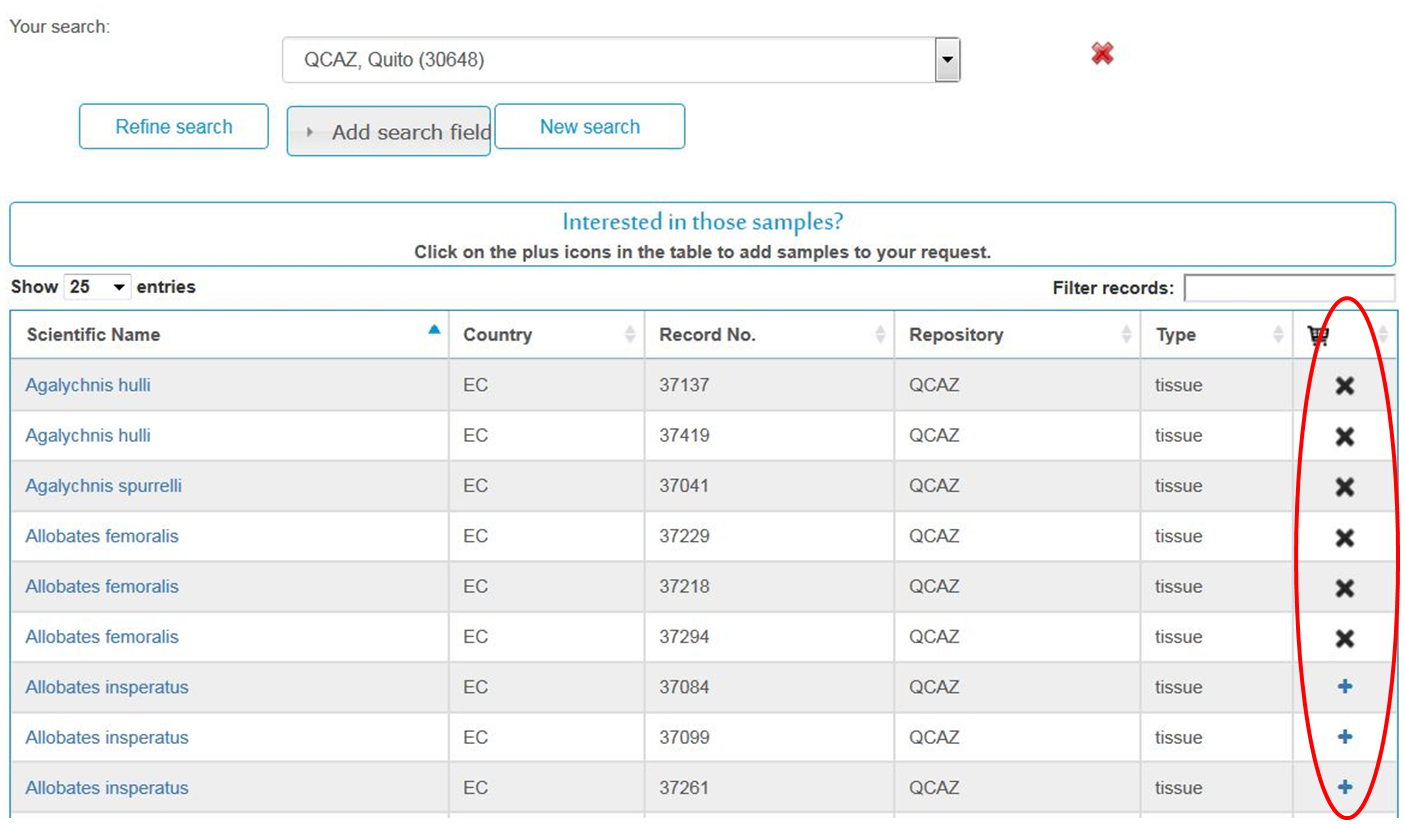
'''Subscription, Save Searches''' When logged in the hitlist shows an additional column to add samples to the cart. If a sample is not available for loaning for some reasons there is an 'x'. On top right appear buttons to subscribe to this search (and get informed via email if new records are available) as well as to save this search or add selected samples to the cart. You can also add a sample to the card via the details page.
[[File:GGBN data portal hitlist logged in.jpg|center|700px]]
'''Shopping Cart''' If you have added samples to your cart you can go to "View cart" or "Shopping Cart" via the menu or the buttons on right. In step 1 you will see an overview of requested samples and if it is a CITES taxon again a note. Please make sure you belong to an institution registered with CITES, otherwise you can't loan such samples. Go to "Checkout" to proceed.
[[File:GGBN data portal shopping cart step1.jpg|center|700px]]
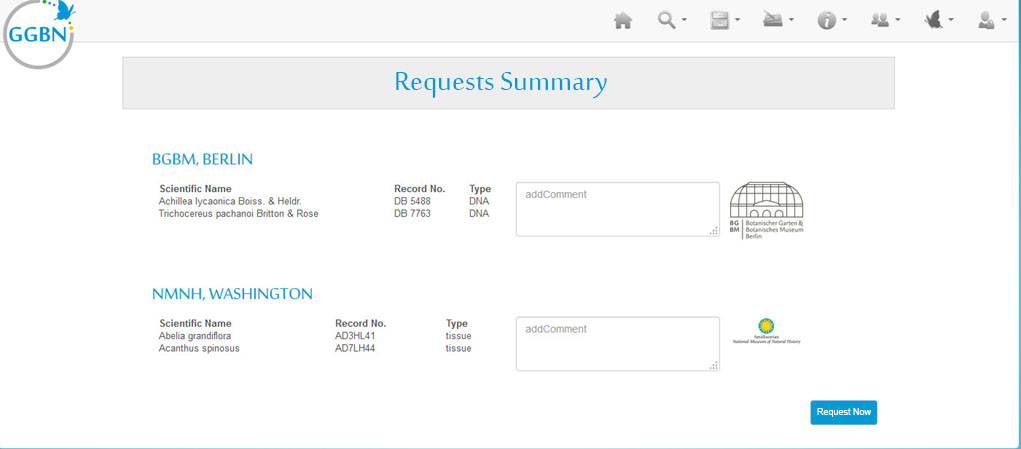
In step 2 the samples are grouped by holding institution. In this example we preorder at two different institutions. You can add a comment to them if you want. When clicking "Order now" your preorder is placed. GGBN forwards your request to the holding institutions. We do not forward your complete order, but only sample information relevant for the sample holding collection.
[[File:GGBN data portal shopping cart step2.jpg|center|700px]]
<div id="wikinote">'''Note: You can only preorder samples. It might be that the samples cannot be loaned to you for some reasons. The curator will contact you and provide details about further procedure. Every GGBN partner is responsible for its samples and procedures. Some partners may require a service charge. In any case you have to sign a Material Transfer Agreement before samples can be loaned. The curator will provide you more details about it.</div>
ENDOLD
The GGBN Data Portal provides an easy way to explore and request samples worldwide. '''''In order to do so you need to login/request an account.''''' The account will be validated manually.
The GGBN Data Portal provides an easy way to explore and request samples worldwide. '''''In order to do so you need to login/request an account.''''' The account will be validated manually.
To preorder samples or subscribe to searches you must register as a user. To do so click on "log in" or the little human in the menu. We appreciate if you fill out the complete contact information, since these data can then be forwarded to the sample holding institution, but this is not mandatory.
Your orders will be forwarded to the respective institution holding the requested samples. Please check our Data Privacy Statement for more information about storage of user data. If you don't want to register as a user you can also send us an email at info@ggbn.org.
After login a menu will appear under the human icon.
Profile Change your personal information here.
Settings Personal settings for the hitlist can be defined here.
Subscription, Save Searches When logged in the hitlist shows an additional column to add samples to the cart. If a sample is not available for loaning for some reasons there is an 'x'. On top right appear buttons to subscribe to this search (and get informed via email if new records are available) as well as to save this search or add selected samples to the cart. You can also add a sample to the card via the details page.
Shopping Cart If you have added samples to your cart you can go to "View cart" or "Shopping Cart" via the menu or the buttons on right. In step 1 you will see an overview of requested samples and if it is a CITES taxon again a note. Please make sure you belong to an institution registered with CITES, otherwise you can't loan such samples. Go to "Checkout" to proceed.
In step 2 the samples are grouped by holding institution. In this example we preorder at two different institutions. You can add a comment to them if you want. When clicking "Order now" your preorder is placed. GGBN forwards your request to the holding institutions. We do not forward your complete order, but only sample information relevant for the sample holding collection.
Note: You can only preorder samples. It might be that the samples cannot be loaned to you for some reasons. The curator will contact you and provide details about further procedure. Every GGBN partner is responsible for its samples and procedures. Some partners may require a service charge. In any case you have to sign a Material Transfer Agreement before samples can be loaned. The curator will provide you more details about it.
ENDOLD
The GGBN Data Portal provides an easy way to explore and request samples worldwide. In order to do so you need to login/request an account. The account will be validated manually.
Once logged in you'll see different icons in the right column (x = blocked for loaning, + = can be loaned). By clicking on the plus the sample will be added to your request
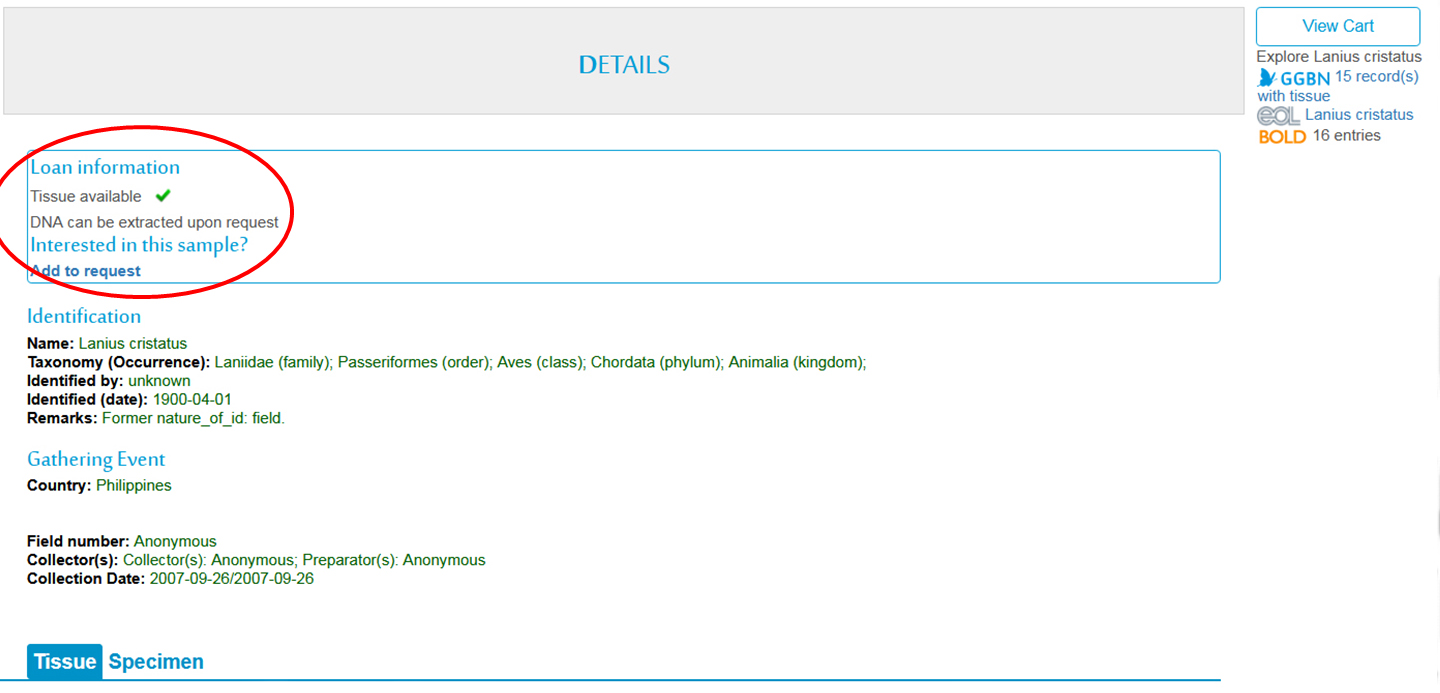
Above the record you'll find information about availability and can request it by clicking on "Add to request"
Basket and checkout
File:Request overview.jpgExample request basket for samples requested from two different institutions. In case it is listed under CITED you'll see a note in red
When checking out you'll see the samples grouped by the holding GGBN member institution. For each institution you can add a note
Click on "Request now" and the email will be forwarded to the sample holding institutions. You will receive a confirmation email.
Note that the samples are owned by the sample holding member institutions, hence this request is not binding. They will contact you shortly to provide you with any futher information such as MTA signature, special loan conditions or fees
In case you are requesting samples from multiple institutions they will ONLY receive the request for their own samples!